Effortlessly make backup copies
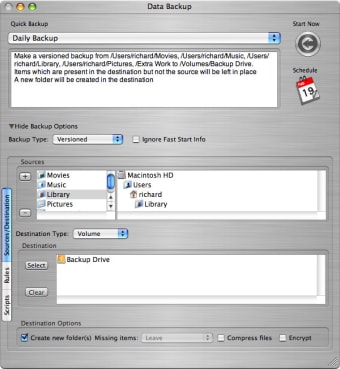
Data Backup is a powerful solution to make copies of your files. We liked how easy you can browse and select files to backup. At the top of the interface there's also a drop down bar to choose whether making a backup of all your files or just photos. You can split large files into even parts to save on different CDs and DVDs. Fast Start is an interesting addition to this new version and speeds up the process by only looking for those files that have been updated.
Top Recommended Alternative

At times we found the interface a little bit confusing. The sidebar on the left of the interface would probably have been better in another area. Data Backup lets you set filters but we were disappointed to find out that they can only include or exclude names and not other criteria like size or file type. Similarly the Schedule feels a bit clunky to use and doesn't provide any real guide as to how you can create new events.
Despite these drawbacks, Data Backup is very useful if you need to make copies of files regularly.
Changes
Fast Start - Fast Start makes use of the file system events system available in Mac OS X 10.4 and above. After the first backup between a source and destination is performed, Data Backup will track the changes to the source. When a subsequent backup is performed Data Backup will backup those files that have changed without needing to scan the entire source for changes. This yields substantial speedups in backup processing for larger volumes. Please see the manual for more details. Supports burning to CD/DVDs with spanning across multiple volumes Large files can be split across multiple CD's or DVD's Multiple copies of backups can be created Backups to CD or DVD can be unattended as long as there are sufficient blank media mounted in drives attached to the computer. Data Backup will automatically "spill over" from one blank CD or DVD to the next if the "Use media in drive" option is selected. See the manual for more details.